

Bloomreach Experience Manager V17.1 Release Notes
Highlights for v17.1
We are pleased to announce a new version of Bloomreach Experience Manager (brXM). This minor release introduces a number of new features, useful technical stack upgrades and improvements to the product. In this document we will give a brief overview of the highlights in this release. You can also find these release notes at: https://xmdocumentation.bloomreach.com/about/release-notes/release-notes-overview.html
Everything mentioned in this document is an integral part of Bloomreach Experience Manager (brXM), unless mentioned otherwise.
Significant Updates and New Features
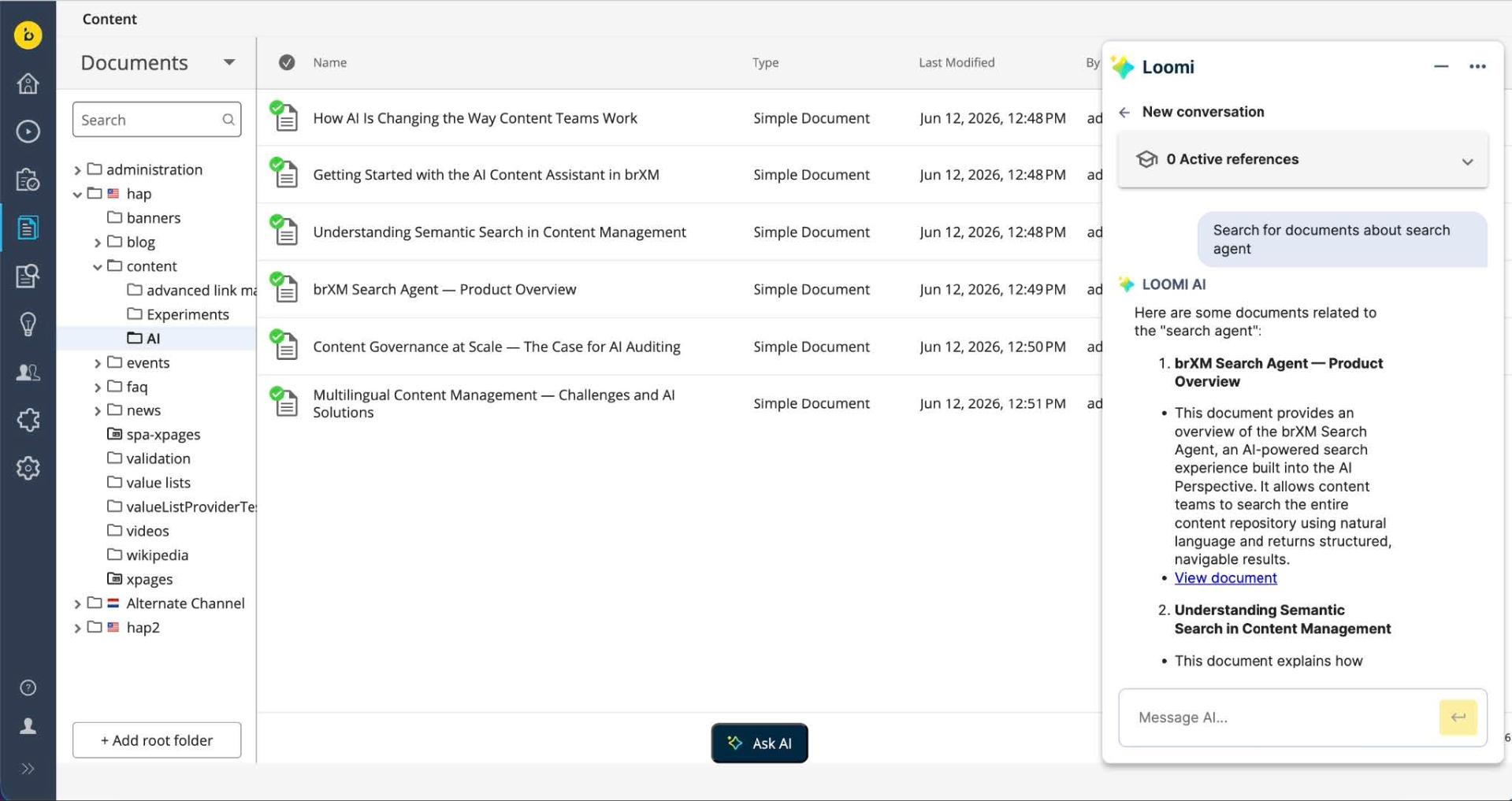
Search Agent: Repository-Wide Content Discovery
The AI Content Assistant now works beyond the document an editor has open. The Search Agent searches the entire content repository in natural language and returns the most relevant documents. It matches on meaning rather than exact keywords, surfacing related content even when terminology differs or the material lives elsewhere in the repository.
This makes the assistant useful across the full content lifecycle. Editors can confirm whether a topic is already covered before creating new content, identify documents affected when a product, policy, or regulation changes, and bring relevant material into the conversation as working context. The Search Agent is available to all brXM customers.
Developer notes:
Result depth is controlled by the new optional property brxm.ai.tools.search.max-results (default 5, up to 20). See Initialize and configure the AI Content Assistant via Properties files documentation for more details.
Vector Store: PostgreSQL (PgVector) Support, and the Search Agent on Bloomreach Cloud
The Search Agent's repository-wide search relies on a vector store that indexes content for semantic matching. With 17.1.0, brXM supports PostgreSQL (PgVector) as a vector store alongside Redis, giving teams more deployment flexibility and the option to use a database they already operate. PgVector support is also what enables the Search Agent on Bloomreach Cloud for the first time, extending repository-wide content search to Cloud customers.
Bloomreach Cloud: The Search Agent is available with 17.1.0 using a Bloomreach managed PostgreSQL (PgVector) vector store. Contact your Account Manager or Bloomreach Support to enable it for your environment.
Developer notes:
Select the active store with brxm.ai.vectorstore (Redis or PgVector); PgVector is configured under the brxm.ai.vectorstore.pgvector.* namespace. See the Vector Store and Ingestion guide.
Set Up AI Features from Essentials
Developers can now configure more of the AI setup directly in the Essentials application rather than editing properties or JCR by hand, including the LiteLLM connector, a custom completions path, and the vector store that powers the Search Agent. This speeds up standing up an AI-enabled project, particularly in development environments for testing. See Initialize and configure via Essentials.
Ongoing Enhancements and Fixes
For end users
Experience Manager
-
Dropdown fields backed by a custom value list provider did not render in the Experience Manager. They now render correctly so editors can set those values.
-
All channel characteristics disappeared when a single entry was missing from the characteristics configuration. Characteristics now display correctly when an entry is missing.
-
Channel locale icons were broken in the channels overview after upgrading to 17.0.0. The icons display correctly again.
-
A locked container did not show which user held the lock. The container now shows the username.
-
In a folder picker (for example, a component's folder-path field), folders that had become Experience Page folders could be opened but not selected, leaving the OK button disabled. These folders can now be selected like regular folders, restoring the behavior.
-
When the relevance feature is turned off, the Experiments tab still appeared in the component panel, along with the trends and goals views in Content Audiences. These now stay hidden when relevance is disabled.
-
Compound fields in the Visual Editor could only surface a single validation message. Multiple validation messages per compound field are now supported.
Content Editor
-
Previously, refreshing a page would bypass validation for Asset and Image fields, potentially allowing invalid documents to be saved. To ensure data integrity, the updated system now discards all unsaved changes for assets and images upon a page refresh, preventing any save operations that haven't passed validation rules.
-
In multilingual repositories, similarly named results were hard to tell apart. Document search now shows each result's language, so editors can pick the right localized version.
-
Previously, resource bundle revisions displayed current values rather than the accurate historical data for the selected revision, which hindered editors' ability to track history or verify what they were restoring. Revision functionality now operates correctly for resource bundles.
-
Changing the URL name while renaming a folder or document can break existing links and references to that content. Editors are now warned about the impact before the change is applied.
-
The requester's display name is now shown in publication request notifications and the reject/feedback dialog, replacing raw user IDs. This is resolved automatically by checking for a full name, then an email address, and finally falling back to the user ID. This same name resolution logic has also been integrated into the homepage activity stream.
Home 2.0
-
On Home 2.0, the "See all" link for Pending Requests led to a 404 error, so editors could not open the full list. The view now opens correctly. Please note that the “See all” button is only available if the Advanced Search feature is enabled.
For developers
Experience Manager
-
Opening a channel in the Experience Manager always loaded its home page first, which added delay for channels with many or deeply nested document references, even though editors usually work on other pages. A new per-channel setting lets administrators defer the home-page load until a specific page is opened by the user, so the channel loads faster. Find more information about the configuration in Defer Channel Preview Load documentation.
AI Content Assistant
-
AI usage for embeddings generation is now recorded for all model providers,, giving clearer visibility into AI token usage. Usage by the background ingestion process is attributed to a dedicated system identity.
Platform and stability
-
URL generation applied encoding inconsistently and mishandled certain special characters. It now applies a consistent encoding standard and handles special characters correctly.
-
A WARN log was written on every navigation to the CMS application in 17.0.0. The spurious warning has been removed.
-
A new configuration option lets administrators exclude system properties from being displayed, keeping internal fields out of view where they are not relevant.
-
Under concurrent load, the multi-repository session pool could throw an intermittent error during request cleanup. The underlying race condition has been resolved, improving stability.
-
The deprecated MimeTypeMapper utility has been removed. Use HippoServiceRegistry to obtain the MIME type mapping service.
-
Apache Wicket has been upgraded to 10.9.1.
This release includes additional third-party library upgrades, security fixes, and internal improvements. The full list is available in the 17.1.0 Detailed Release Notes.
Bloomreach SPA SDK Updates
SPA SDK 28.0.0: A Lighter, Simpler SDK
SPA SDK 28.0.0 is a major release, available June 19, 2026, focused on making front-end development faster and lighter. The core SDK is about 38% smaller and simpler, so applications built on it ship less code and are easier to maintain. Connecting the SDK to your own data-fetching setup is now more straightforward, with ready-to-use examples for both client-side and server-rendered apps.
This is a breaking release: it drops support for the legacy Page Model API v0.9 (the SDK now uses v1.0 only and removes a few long-deprecated methods. Projects on older patterns should review the migration notes. See the SPA SDK releases for the full changelog and migration details.
Bloomreach Cloud Updates
Search Agent on Bloomreach Cloud
The Search Agent is now available on Bloomreach Cloud through a Bloomreach managed PostgreSQL (PgVector) vector store, so Cloud customers can offer repository-wide content search to their teams. See the Vector Store update above. Opt-in; contact Bloomreach Support or your Account Manager to enable it.
Ecosystem & Add-on Updates from Professional Services Team
Bloomreach Forge Plugins Upgraded for brXM 17 Compatibility
The following Bloomreach Forge community plugins have been updated for brXM 17 (Java 21 and Spring Boot 4) compatibility.
-
B.R.U.T.
-
IFrame Perspective
-
Review Workflow
-
Folder Context Menus
-
Breadcrumb
-
xm-s3-manager
For the current status and released version of each plugin, see the Forge project list. Additional plugins are being upgraded progressively.
Get help from Bloomreach Content Experts for Upgrade
The Bloomreach Professional Services team possesses extensive expertise in Bloomreach Content and has successfully executed various project implementations. Our team can facilitate a seamless upgrade of your project to the latest BrXM versions.
Additionally, we offer an Upgrade Assessment service for your projects. In just 3 days, our comprehensive evaluation will provide you with invaluable insights into your investment requirements. Our team of experts meticulously assesses your existing systems and infrastructure to determine the necessary investment for the upgrade.
The resulting detailed report encompasses the following components:
-
Executive summary
-
Overview of major changes
-
Recommended upgrade procedure
-
A comprehensive list of findings
It's important to note that the evaluation fee* is fully refundable should you decide to proceed with our Professional Services for the actual upgrade. This ensures that you not only receive top-notch guidance but also keeps your best interests in mind.
If you're interested in availing the assistance of our Professional Services team for your upgrade, please get in touch with your account manager. We're here to support your project's success every step of the way.
Notices
MimeTypeMapper removed.
The deprecated MimeTypeMapper utility has been removed. Projects that call it directly must obtain the MIME type mapping service from HippoServiceRegistry instead.
Repository node type (CND) changes
This release introduces the following node type definition (CND) changes:
-
added property hst:deferpreviewload (boolean) to the node type hst:channel
-
added property hippostdpubwf:rejectedBy (String) to the node type hippostdpubwf:request
Important: simple rollback not supported
The above CND change means that an upgrade to 17.1.0 cannot be rolled back simply by redeploying the previous distribution on the already upgraded repository, by swapping binaries or containers. If you need to downgrade, you must restore from a full repository backup taken before the upgrade.
Minor release
v17.1 is a minor release, so it is backward compatible with the previous minor release. Also, updating to this version from the previous minor version should be of little effort. Specific instructions for upgrading from v17.0 to v17.1 are available for enterprise customers (login required). Please also find the overview of minor version upgrade instructions in this major release in our documentation.
Supported Technologies
Full system requirements, including a comprehensive table of maintained third-party compatibility, are available in the system requirements documentation.
End-of-life, support and maintained code
Nomenclature refresher
As the terms ‘end-of-life’, ‘supported’, ‘maintained’ are used in various ways in our industry, we clarify the nomenclature we use for this below.
Supported product version
When a product is supported, this means that the customer will receive help from the helpdesk when issues arise as described in the service level agreement (SLA) that the customer has with Bloomreach. There are several service levels available.
Please note that if a bug is acknowledged in a supported, but not-maintained version, and a fix is needed, this fix will only be applied in the maintained product versions. This means the customer will need to move to a maintained version to receive the fix.
Maintained product version
When a product is maintained, the product code is updated and security- and bug fixes are made to the code. For maintained products, the system requirements for third party libraries and components are kept updated as well. Please note that we do not provide support for system requirement providers (e.g. databases, java, etc..), but we only support the usage for mentioned certified system requirement providers.
If a product is non-maintained, this means that the code is not maintained anymore and therefore might contain bugs and/or security vulnerabilities due to newly discovered issues in our code, or the libraries used.
End-of-life product version
Products that are not maintained and not supported are end-of-life. These might be available from our archives but could be removed without notice.
What does this mean for the current release?
Please note that this release changes existing maintenance or support modes. In the table below you can find the support status of your product and when support will end; this is dependent on the version currently being used and license level. Please note that versions that are not listed are not active and not supported, and therefore end-of-life.
|
Version |
Planned end date of |
Planned end date of |
Original major version release date |
| Latest 14.x | December 2024 | December 2025 | December 2019 |
| Latest 15.x |
December 2025 |
December 2026 |
April 2022 |
| Latest 16.x | December 2026 | December 2027 | June 2024 |
| Latest 17.x | December 2027 | December 2028 | May 2026 |
Figure: reference table of planned end of support dates based on current SLA terms. Supported versions may differ depending on contractual agreements.
The versions highlighted in orange are actively maintained and provided with bug fixes and product improvements.
Security notes
This release includes updates for third-party dependencies that have published vulnerabilities. We recommend that customers keep their systems up to date with announced product releases.
Availability
This version of brXM is available as of June 18, 2026 onwards, the release of the open source will be made available after approximately 2 years due to our release policy.